Hack

Multiplatform Instant messaging

July 16, 08 by Crossover
advertisment

Thanks for visiting! If you're new here, you may want to subscribe to my Rss Feed. This blog posts regular Internet news, updates for apps, security, ideas, hacks, quick fixes and everything about hi-tech. Go ahead, subscribe to our feed!

image

Psi is a free instant messaging application designed for the Jabber IM network (including Google Talk). Fast and lightweight, Psi is fully open-source and compatible with Windows, Linux, and Mac OS X.


Whether you use Windows, Linux, or a Mac, Psi is right at home on your desktop. From the system tray icon on Windows to the dock badges on Mac OS X, Psi takes advantage of each operating system’s unique features and appearance to provide a first-class IM experience on almost any computer.

feature_windows

Read the rest of this entry »

Instant Messenger for Ubuntu Linux

July 12, 08 by Crossover
advertisment

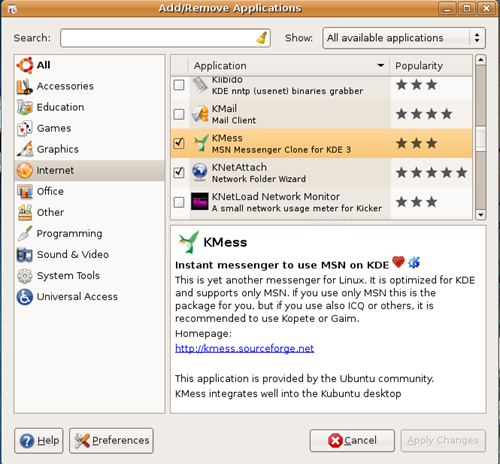
screenshot-kmess-download-linux-ubuntu-messenger

For Ubuntu we have just to decide what Instant Messenger to use. Pidgin very popular,aMSN really good. We have also KMess Instant Messenger like Windows Live Messenger in Windows. Very simply steps how to install. As you see from the screen shot above, select KMess from Internet Applications and Apply Changes.

Read the rest of this entry »

How to open more than one MSN account in one pc

July 04, 08 by Crossover
advertisment

msn-account-live-download

MSN Messenger only allows you to run once instance at a time, and that one instance can only log in as a single user but as you see in the image I have open more than one windows live messenger accounts on my computer. There are many ways how to do this. I will show you two.

The fist is to download Messenger Plus! and configurate  to allow multiple account.

Read the rest of this entry »

Add Windows Live Messenger to your Website

December 13, 07 by Crossover

msn3

The Windows Live Messenger IM Control lets people on the Web reach you in Messenger by showing your Messenger status on your web site, blog, or social networking profile. The Windows Live Messenger IM Control runs in the browser and lets site visitors message you without installing Messenger first. The IM Control is supported in IE6, IE7, and Firefox 2.0 on Windows and Firefox 2.0 on Mac OS. The IM Control is supported in 32 languages.

This is a nice addition to the IM button functionality announced in Ali’s post.  An important difference between the two is that the new Windows LiveMessenger IM Control allows people to send you IMs without installing Windows Live Messenger, and the IM button requires that they have it installed and are logged in.

To use the IM Control:

Read the rest of this entry »

Download Yahoo Messenger for Vista!

December 07, 07 by Crossover

screen2_scale

Early this year in January, Yahoo announced that they had designed a new messenger from the ground up just for use with Windows Vista. They wanted to take advantage of all the new features specific to Vista like the display and user interface, as well as Vista’s Windows Presentation Foundation. The previews looked awesome and the list of features was sure impressive, but it’s been almost a year now and we hadn’t heard anything about it’s progress or whether or not they were even working on it… until today! That’s right, it’s not vaporware like some of you thought. It’s finally here and for those of you just itching to try it, a preview release is available for download.

screen2_sidebar

So what makes this version of Yahoo Messenger specific to Windows Vista? There are two main things:

  • New interface that takes advantage of WPF
  • Makes use of Windows Vista Sidebar

There’s a whole list of features that are pretty impressive:

  • Huge selection of new and improved animated emoticons
  • Color code chat windows (pick a different color for each contact you’re talking to so it’s easier to keep track of)
  • Combine chat windows into one and then they will be tabbed with all conversations in one window
  • Drag contacts from the contact list onto the sidebar gadget so that keeping track of their status is easier, and then starting a conversation takes one click
  • Drag and drop files up to 2GB in size into the message Window
  • Spell check as you type (knows LOL isn’t something that needs to be corrected)
  • Works with Windows Live Messenger contacts
  • Resize contact list (multiple columns if you’d like) and resize the size of your buddies avatars

The Yahoo Messenger for Vista team put together a video that shows all of the new features in action.  There’s a high quality version available which you can view, or you can just view the video below in a lower quality.

[yahoo 1577005]

Yahoo! Messenger check it out

{via cybernetnews}

Microsoft Plans Flickr Competitor

November 14, 07 by Crossover

flickr-insp

An anonymous reader writes

"Judging by newly posted job calls, Microsoft is now working on a Flickr-like online photo service. ZDNet reports: ‘"This feature team is building a next-generation photo and video sharing service that will compete with Flickr, SmugMug and other photo web solutions today. This is a ‘v1′ opportunity," the ad said. And video will be a part of the effort, too: "This role will work across the new Windows Live division with teams like Spaces, SkyDrive, Messenger and Hotmail to construct a winning strategy for Microsoft in photo and video sharing." Evidently, Microsoft sees the effort as an online extension of its current desktop technology.’ Gundeep Hora, at CoolTechZone, feels that such a service is unlikely to succeed, and lays out the numerous challenges the company will face upon entering the market."

[via Slashdot]

Trillian for Macs Has Arrived

October 09, 07 by Crossover

trillian Read the rest of this entry »

Close
E-mail It