Hack

View Hidden Files and Folders in Ubuntu Linux
August 02, 08 by ReniX

ubuntu_hidden-files

The Ubuntu file browser does not show hidden files or folders by default, only the files that your user has access to.Here is the small tip how to view Hidden Files and Folders in Ubuntu File Browser

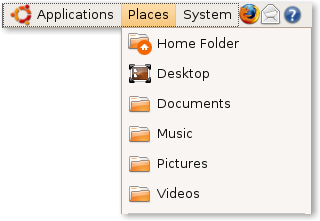
1. Go to the Main Menu, click on Places, and select Home Folder (any of the selections that will open up in the File Browser will work).

Read the rest of this entry »

Thanks for visiting! If you're new here, you may want to subscribe to my Rss Feed. This blog posts regular Internet news, updates for apps, security, ideas, hacks, quick fixes and everything about hi-tech. Go ahead, subscribe to our feed!

How to show Hidden files and folders

February 15, 08 by Crossover

To show hidden files and folders under Windows XP or Windows Vista you have different ways to access this options.

Windows XP

To enable the viewing of Hidden files follow these steps:

1. Close all programs so that you are at your desktop.
2. Double-click on the My Documents icon.
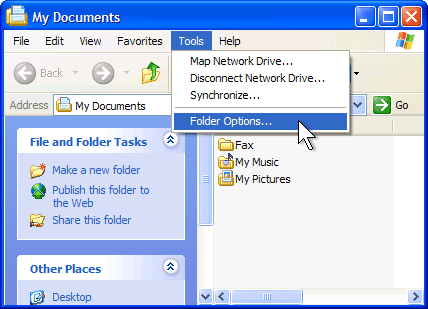
3. Select the Tools menu and click Folder Options as it shows in photo:

67433-click-folder-options

4. After the new window appears select the View tab

Read the rest of this entry »

Close
E-mail It