Hack

Third-party ads for Google content network

May 22, 08 by Crossover
advertisment

Thanks for visiting! If you're new here, you may want to subscribe to my Rss Feed. This blog posts regular Internet news, updates for apps, security, ideas, hacks, quick fixes and everything about hi-tech. Go ahead, subscribe to our feed!

How to control third-party ads shown on your site
The same ad management features for Google ads also apply to third-party ads. You can use the Ad Review Center to filter specific placement-targeted ads from appearing on your site. To block contextually-targeted ads from a given advertiser, you can use the Competitive Ad Filter. (The Ad Review Center currently only shows placement-targeted ads, not contextually-targeted ads.)
Optimizing your site to allow third-party ads
To allow third-party ads on your site:

  1. Opt into image ads - Currently, third-party ads are only available in image or Flash, so they won’t appear in text-only ad units.
  2. Enable advertisers to target your AdSense channels - Most advertisers who use third-party ads are brand-conscious. They prefer to specify websites where their ads will appear in order to optimize the targeting and effectiveness of their campaigns.
  3. Opt into placement targeting - Placement targeting will allow advertisers to target their ads specifically to your site.

Following these steps will enable your site to accept third-party ads. However, we can’t guarantee where or when third-party ads will appear on your site.

adsense blog

The Big Word of Advertising - Make Money On Line

January 16, 08 by Crossover
advertisment

make-money-on-line

  • Google Adsense : The king on the network. Most used ads program from webmasters. (CPC)

Other Alternatives to Google Adsense:

Don’t forget both rivals like:

Other Ads programs are:

Read the rest of this entry »

Google Adsense Tips and Change Announcement

November 14, 07 by Crossover
advertisment
by Martin

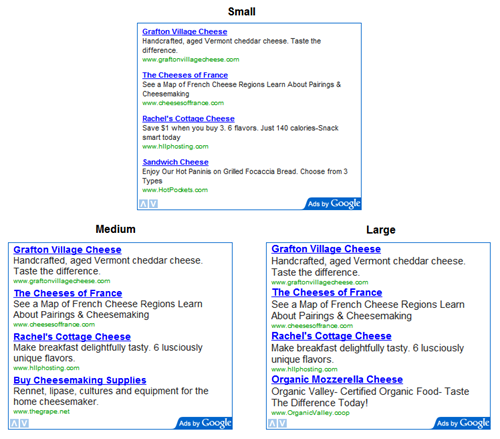
A list of tips was published at the official Google Adsense blog Inside Adsense which should help maximize revenue potential. The tips are to turn custom channels into ad placements which will highlight parts of your website to advertisers, to enable text and image ads on your website and to use the 300×250 medium rectangle because many advertisers use this specifically when creating rich media ads.

I’m using ad placements for a while with no obvious result whatsoever but it could be rather site specific. If I recall correctly those ads can then be booked directly at the website. It is not working at all for me but it does not cost anything and it could work for your website.

The second tip is a no brainer as well and I’m using this setting for a very long time. Image ads are mainly paid on a CPM basis while text ads on a CPC basis. Remember that the best paying unit is shown which could be either, so activate both.

Read the rest of this entry »

Fast edit for AdSense script

November 06, 07 by ReniX

getads_naming.PNG

From Adsense blog: Two weeks ago, we gave you a sneak peek of what was in store for November. Now, we’re happy to let you know that we’ve started rolling out our new ad management feature to publishers! As a reminder, this feature will save the settings of your ad units within your AdSense account. That means, each time you want to change the colors, channels, or even the corner styles for your ad units, you can make the changes directly in your account rather than generating and pasting new code. Again, we’re still working on rolling this feature out to all publishers, so don’t worry if you don’t see it in your account yet — it’ll be there soon.

Below are a few answers to questions you might have about this new feature:

How has the process of generating new ad code changed?
On the ‘Get Ads’ page of the ‘AdSense Setup’ tab, you’ll find the same code generation wizard you’ve used before. At the end of the wizard, you’ll now be prompted to provide a name for the ad unit you’ve just created. We recommend using a descriptive name so that you’ll remember where you pasted this ad unit. For instance, use names like “Homepage Leaderboard, example.com” or “Top 300×250, Sports pages.” You can find more detailed instructions in our Help Center.

Why do I need to name my new ad units now?
With this new feature, all your new ad code will have a name and an unique ad slot ID. This will help you remember them so you can make changes to them later directly on the ‘Manage Ads’ page. As noted above, please be as specific as possible when naming your ad units and include information such as location, ad size, and domain.

Will the old ad code on my sites still work?
Any ad code you’ve generated in the past will continue to work as normal. However, please note that the old ad code will not automatically be updated to include this feature. If you’d like to apply this new feature to your old ad units, you can import the code and save the new settings.

Why don’t I see anything after adding a new ad unit to my site?
If you’re implementing a newly created ad unit on your site, the ad unit may not appear for up to 10 minutes while our servers are informed about the settings for the new unit. Don’t feel like waiting? Simply use the Preview function on the ‘Manage Ads’ page to check out your updated pages immediately.

Read the rest of this entry »

AdSense now with Resources tabs

November 04, 07 by ReniX

resources_tab.PNG

From Adsense Blog: We know it can be tough to keep track of all the official AdSense-related documentation we’ve put online; that’s why we’re happy to introduce you to the new Resources tab in your account. Read the rest of this entry »

Close
E-mail It