Firefox Bookmark Previews
July 07, 08 by CrossoverThanks for visiting! If you're new here, you may want to subscribe to my Rss Feed. This blog posts regular Internet news, updates for apps, security, ideas, hacks, quick fixes and everything about hi-tech. Go ahead, subscribe to our feed!
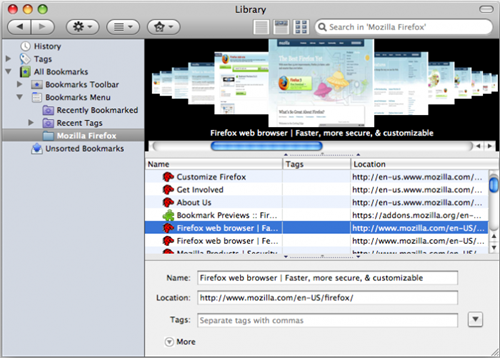
Along with an album view (like cover flow) and a thumbnail view (with drag and drop), this extension also adds previews to the tooltips in the bookmarks sidebar. Just hover over a bookmark in the sidebar to see the previews.
In Firefox 3 you can access the two new views by opening the Library. To get there go to Bookmarks>Organize Bookmarks. From there you can toggle the view with the 3 buttons to the left of the search box or from the View menu.
Glad to see you here and Thank You for your visit. My name is Lirent, born in February 1983 in a small city in Europe. This is my blog about Hacks, Tips and Free Resourse for the WordWideWeb.