July 17, 08
by
Crossover
advertisment

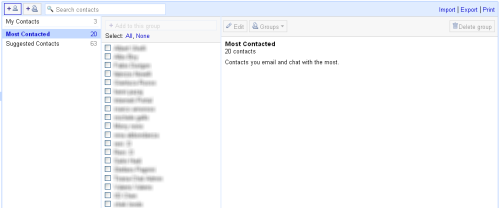
I was browsing my Gmail contacts and i just notice that something is changed. It look nice and more useful.
Share This
Thanks for visiting! If you're new here, you may want to subscribe to my Rss Feed. This blog posts regular Internet news, updates for apps, security, ideas, hacks, quick fixes and everything about hi-tech. Go ahead, subscribe to our feed!
-
Posted in
Gmail - 89 views
December 06, 07
by
Crossover
advertisment
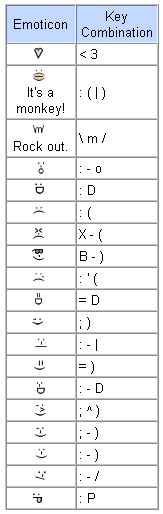
Some emoticons that you can use for Gmail chat, was unknown stuff but are very nice.
To use emoticons, just choose one of these options:
- Type the appropriate combination of keys and press Enter.
- Click the blue smiley-face button at the right of the text-entry field. A pop-up menu appears, where you can choose from different emoticon sets, including circular, rectangular, or standard.
Here’s a list of the cool emoticons in standard format:
Enjoy!
Share This
-
Posted in
Gmail - 4,511 views