Hack

How to add background to textarea – CSS Hack

August 19, 08 by Crossover
advertisment

Thanks for visiting! If you're new here, you may want to subscribe to my Rss Feed. This blog posts regular Internet news, updates for apps, security, ideas, hacks, quick fixes and everything about hi-tech. Go ahead, subscribe to our feed!

background-comment-wordpress

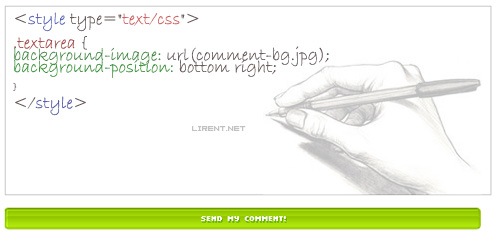
Playing with CSS you can create really pretty things. While I’m working a new theme for my blog that soon will be available, here is one of the CSS hacks that I’m using for comments text area. There are many ways of customizing your form elements. I will show you a way how to do this.

You can apply a background-color or background-image to any form element. Like the example i’m using  in a textarea adding a background (in the image above). Please be careful because sometimes it is not a good idea to change the background. The part of the text is very hard to read if you apply a image with lot of colors. Chose a white and black background and edit the opacity to 50% with any image editor.

Read the rest of this entry »

CSS Hack max width like image resize

July 19, 08 by ReniX
advertisment

css-hack-image-align-blog-post

Recently I was fixing some CSS image alignments and the width for images. And the problem was with the big images that come out of content?! At this point comes out max-width. The max-width CSS property is a great property to use when you don’t want an element to get larger than a certain size. It does exactly what it says it does. Using it with images can be very handy. Here’s the syntax.

selector {max-width:value;}
Read the rest of this entry »

Remove Top bar In Blogger Blogs

July 12, 08 by Crossover
advertisment

blogger-remove-top-bar-nav-google-blog-hack

Here is a simply hack for blogger. A CSS hack how to remove the Navbar (topbar) in blogger. In some simply steps you will be able to have a professional look for you blog hosted for free at blogger.com

1. Login to your Blogger account.

2. Click Layout, in your blogger dashboard. And after > Edit HTML

blogger-edit-template

Read the rest of this entry »

Close
E-mail It