Hack

How to backup my blog at Blogger.com

August 07, 08 by ReniX
advertisment

Thanks for visiting! If you're new here, you may want to subscribe to my Rss Feed. This blog posts regular Internet news, updates for apps, security, ideas, hacks, quick fixes and everything about hi-tech. Go ahead, subscribe to our feed!

BloggerBackup-free-software-google

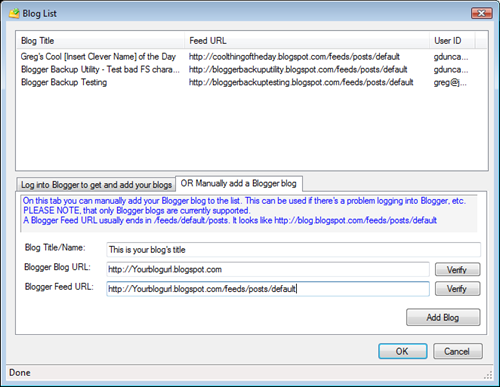
Backup website is highly recommended. But Blogger.com still don’t offer this options. Here is a tool that can backup you posts in your blog hosted at blogger.com Called Blogger Backup and can backup to local disk your Blogger posts. Using the GData C# Library, the utility will walk backward in time, from your latest post to your last, saving each post to a local Atom/XML file.

Read the rest of this entry »

WordPress for iPhone Officially Available

July 22, 08 by ReniX
advertisment

image

WordPress for iPhone just launched on the App Store. Download it now and get to blogging. More information about the project and how the users can contribute will be published soon.

Here is what you’ll get with this new iPhone application:

  • Support for WP.com blogs and self-installed blogs version 2.5.1 and higher
  • Embedded Safari for true previews of posts
  • Full tag and category support
  • Photo support for both camera pictures as well as library photos
  • Support for multiple blogs
  • Ability to password protect a post, save as a draft, or mark the post for later review
  • Auto-recovery. This will recover posts which have been interrupted by phone calls

Change the default Wordpress Mail Address

July 18, 08 by ReniX
advertisment

email-default-wordpress-com-home-hack

When we receive mail from our Wordpres blog, we see that the default mail is wordpress@yourdomain.com! Times ago I searched on Wordpress files and change the default mail, but every time that I update/upgrade the blog is necessary to make again the file changes. So is so boring. I will show you how to make custom mail sender, with one click :)

Read the rest of this entry »

WordPress 2.6 now Available for download and update

July 15, 08 by Crossover

Wordpress 2.6 is announced. Now we can update our blogs as soon as possible with the new 2.6 features.

Full list of 2.6 features

Remove Top bar In Blogger Blogs

July 12, 08 by Crossover

blogger-remove-top-bar-nav-google-blog-hack

Here is a simply hack for blogger. A CSS hack how to remove the Navbar (topbar) in blogger. In some simply steps you will be able to have a professional look for you blog hosted for free at blogger.com

1. Login to your Blogger account.

2. Click Layout, in your blogger dashboard. And after > Edit HTML

blogger-edit-template

Read the rest of this entry »

Post in your blog from Microsoft Word 2007

June 27, 08 by ReniX

psot-to-blog-windows-office-2007-free-download-wordpress

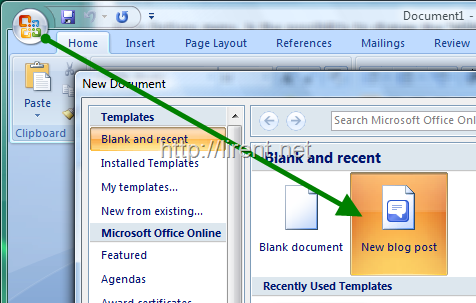
Microsoft Office 2007 offers also a options to post in our blog. So a blog editor. It is very simply and easy to write. Click the Windows World logo and go to New after click to New blog Post, as is showing in the image above.

Read the rest of this entry »

Blogger now schedules future-dated posts

May 02, 08 by Crossover

scheduled_posts-new-google

Scheduled post publishing has finish testing on Blogger in draft last month. Now is live for everyone. If you set a post’s date into the future, Blogger will wait to publish until that time comes.

scheduledposting2

Blogger.com

What makes a successful blog?

March 02, 08 by Crossover

Content

Well as they say content is key, you have to pick a topic from which you have a wide ranging knowledge.  If you can find a niche and strive to become an authority on the topic then people will pay attention.

The regularity at which you add content to your blog also provides a key point in determining whether visitor levels grow.  Frequently added content will help to drive new visitors to your blog whilst also providing regular readers with a reason to keep coming back.

Research research research

Keep your ear to the ground and finger on the pulse looking for the latest news and technologies.  Your users want to find cutting edge articles and if you can’t provide them they will find another site which can.

Create controversy

Now this is something I hear other bloggers mention a lot and to be quite honest I’m not too sure I totally agree, so let me explain.  If your articles cause controversy but you believe in everything your writing and feel you can back up your statements then I have no problem with this.  This is the start of a debate not a war, however, if your sole aim is to cause controversy with the aim of driving traffic and you can’t substantiate your claims/statements then I believe you will only create a negative long term impact on your blog.  Users are not stupid and do not like deliberate and underhand attempts for attention, plus it’s never a good idea to get yourself a bad reputation.

Passion and drive

Your articles must display your passion and drive for your desired topic.  Without this your articles will undoubtedly be a less then entertaining read and more than likely provide very little interest to readers.

Read More (article by andrewsellick.com)

How to use your own site as your OpenID

December 16, 07 by Crossover

Blogger finally supports OpenID, which means WordPress, LiveJournal or Vox users can directly leave comments on Blogger posts. For those who don’t know what OpenID is, it’s a simple URL, which can be used to sign into any site which supports OpenID. Since you’re the only one who has control over your URL, you’re the only one who can use that URL as your identity.

openidnet_logo

How to use your own site as your OpenID URL:

Like most people, I’m not comfortable with handing over the ownership of my personal identity to some third party OpenID handler. I want the flexibility to choose between OpenID providers without having to change my OpenID URL. How? Well, it’s pretty simple. All you got to do is pick any free OpenID provider and create an account (if you already have an account on WordPress, LiveJournal or Vox, you can skip this step). Now add the following lines just above </head> on your weblog or whichever URL you’d like to use as an OpenID URL:

<link rel="openid.server" href="http://www.myopenid.com/server"> 
<link rel="openid.delegate" href="http://username.myopenid.com/">

Replace openid.server href with your OpenID provider’s server URL. Similarly, replace openid.delegate href with your OpenID URL. For instance, if you want to use your WordPress blog as your OpenID provider, then it should be:

Read the rest of this entry »

Close
E-mail It