YouTube Desktop has a new name – iDesktop.tv! The relaunch of the website comes not only with a new name but with plenty of cool new features that will make your browsing and downloading videos even more fun!
The only purpose of our team is to bring satisfaction to all our users and that’s why we tried to fulfil all your wishes in this new version of our website. iDesktop.tv offers you the same design and possibilities as YouTube Desktop but we added many more features that will bring you an even more pleasant experience.
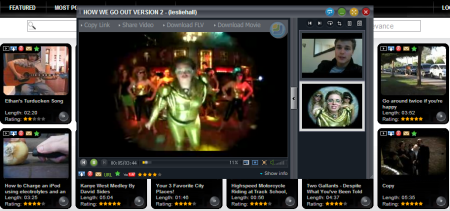
With iDesktop.tv you can make a list of your favourite videos and browse them easily any time you want. When you download a video, you can choose from a great variety of formats to convert it to – AVI, MP4, 3GP, 3GP2, MOV, WMV, FLV, EXE or ZIP. These are a lot more than before and now you have the chance to play the downloaded video with almost any player on your PC, mobile phone, iPhone or iPod without using any other convert program.
The new iDesktop.tv offers you the opportunity to import information from your YouTube user account. For example, you can import your saved playlists or favourite videos. With iDesktop.tv you also have a bigger choice of themes and a variety of new settings.
In the new version of our website we added a video comments list and information about the uploader. You can see other videos from this user or see his favourite ones. Your searching for videos has also been improved in iDesktop.tv as you can sort your results by relevance, date, rating or view count.
Our player also has some new features. You can open a player in a new browser window and you can maximize it. We implemented a choice of four different aspect ratios for the videos as well.
We’re pretty sure that with all these new possibilities iDesktop.tv will become your new favourite web application for watching, downloading and browsing videos!
[via iDesktop]