Hack

Archive for March, 2008

Free Photoshop Web version by Adobe

March 27, 08 by Crossover

web-photoshop

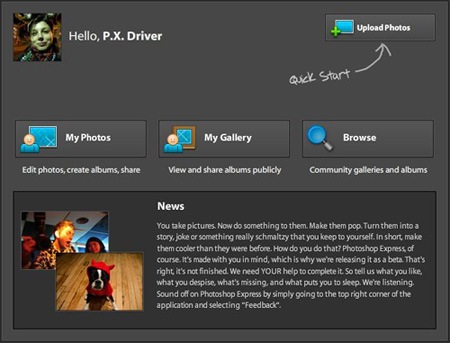
The maker of the popular photo-editing software Photoshop on Thursday launched a basic version available for free online.

San Jose, Calif.-based Adobe Systems Inc. says it hopes to boost its name recognition among a new generation of consumers who edit, store and share photos online.

While Photoshop is designed for trained professionals, Adobe says Photoshop Express, which it launched in a “beta” test version, is easier to learn. User comments will be taken into account for future upgrades.

Photoshop Express will be completely Web-based so consumers can use it with any type of computer, operating system and browser. And, once they register, users can get to their accounts from different computers.

Web-based software is increasingly popular, and Adobe knows it’s got to get on that train, said Kathleen Maher, an analyst at Jon Peddie Research.

Many kinds of software are available for use online in a trend known as “software as a service,” or “cloud computing.” The earliest were e-mail programs, but they now include services to create and manage content and even whole operating systems. And they don’t require time-consuming upgrades because they’re maintained by the service provider.

Read the rest of this entry »

Thanks for visiting! If you're new here, you may want to subscribe to my Rss Feed. This blog posts regular Internet news, updates for apps, security, ideas, hacks, quick fixes and everything about hi-tech. Go ahead, subscribe to our feed!

Mixxx for Dj

March 27, 08 by Crossover

Mixxx_screen_floor

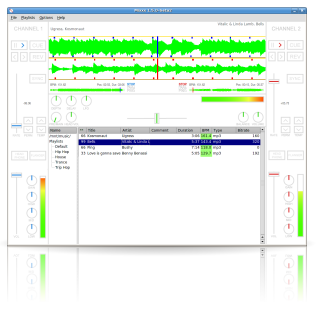
Mixxx is an open source DJ tool designed for both professional and amateur DJs alike. Mixxx allows DJs to mix music live with a clean, simple interface. Futhermore, Mixxx has a number of key features to help DJs in the mix: Beat estimation, parallel visual displays, and support for various DJ hardware controllers Windows XP and Vista, Linux and Mac OSx platform. Include the MP3, Ogg Vorbis and Wave extensions like standards. Is easy to use for novice and professional DJ’s, including live performances.

Download Mixxx

Open .ico with Photoshop

March 27, 08 by Crossover

windows-vista-icon 

  1. download from this site,
  2. open the zip file,
  3. find the folder (File Formats) in your computer, in Windows: C:\Programs\Adobe\Adobe Photoshop CS3\Plug-Ins\File Formats,
  4. copy the file ICOFormat.8bi from zip inside this folder 
  5. open Photoshop
  6. now, when you want to save a .ico file in the list save as… is also the ext .ico.

Create your free forum in 3 steps

March 27, 08 by Crossover

forum 

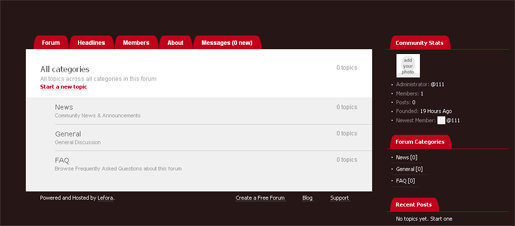
Lefora.com is a Free Forum Hosting. Is Easy to get started, just a few clicks to get the discussion started on our free forum hosting service. Spend less time supporting and moderating community, moderation and Anti-Spam support. You can get promoted Email notifications, RSS, newsletters, and Search Engine (SEO) friendly. Provide a better experience for your community members videos, photos. Check out an example forum.

Reminders and ToDo’s with Firefox

March 26, 08 by Crossover

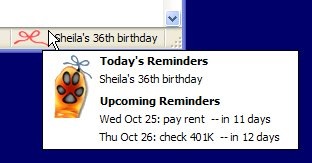
reminder

ReminderFox is an extension that displays and manages lists of date-based reminders and ToDo’s. ReminderFox does not seek to be a full-fledged calendar system. In fact, the target audience is anybody that simply wants to remember important dates (birthdays, anniversaries, etc) without having to run a whole calendar application.

Read the rest of this entry »

10 Tips and Tricks for Private BitTorrent Sites

March 25, 08 by Crossover

blockbuster_p2p_hack_3

The first thing to notice when you join a private BitTorrent site is the eye-popping quality of the torrents. Each one is carefully culled, hand-picked through a strict moderation process. However, before you start hammering away on that download link - here are a few things you need to know.

On private torrent sites, everything revolves around ratios. A 1:1 ratio (or 1.0) means that you’ve downloaded exactly the same amount of data as you’ve uploaded. Thus a 0.80 ratio indicates that you’ve uploaded less than you’ve downloaded, which is hurtful to the health of the torrent. Inversely, a 3.0 ratio means you’ve uploaded 3 times more data than you’ve downloaded. Strive to achieve at least a 1.0 ratio - each site will have specific consequences for members who maintain a ratio of less than this. Attain a ratio over 1.0 and the rewards shall follow you into the P2P afterlife.

If you’re brand-new to a private site, it will be difficult in the beginning to acquire a 1.0 ratio. Luckily, users are given a ‘grace’ period to achieve this. Since there are so many more seeds than leechers (a total flip-flop from public BT sites), it becomes harder to upload to others - due to the fact that there are fewer people to share with.

So why go through all the trouble to keep an honest ratio? Because deep down, you’re an upstanding denizen of file-sharing society! Aside from that shameless pat-on-the-back, good ratios offer many perks, including an upgraded account on the tracker (i.e. VIP status), higher download speeds, free “invites” for your friends, and no waiting periods associated with accounts in arrears.

Here are Ten Tips to get your ratio in top-shape as fast as possible:

1. Start out with Smaller Files

Initially, opt for smaller (i.e. under 1 GB) files for downloading. This gives you a greater chance of someone coming along after you and downloading the same torrent (and you’ll be able to upload to them). Obviously a 700MB movie file will be more appealing to other site members than a 30GB ‘Blu-Ray’ rip.

2. Jump on the ‘Newly Released’ torrents

This is a great tip for increasing your ratio in a hurry. Camp out in your favorite private BT site, and refresh the torrent listings frequently. Newly added entries will have many more leechers than seeds, so you’ll be able to share (upload) more data. To maximize this tip, select smaller files - the “TV Episode” category works great for this.

3. Select Files that have a High ‘L’ or upload number

This is important. When selecting torrents, base your initial selections on a high number of leechers (the more, the better). This will ensure you have many avenues to upload to during (and after) the transfer. When starting out on a new private BT site, we would even go so far as to say that you should download torrents that you don’t want - just start grabbing torrents that have lots of leechers. Once your ratio get over the 1:1 (1.0) mark, delete them.

TIP: If one of your seeding torrents remains popular, leave it running in µtorrent permanently. This will always help to boost your upload ratio.

4. Avoid ‘Zero-Leech’ torrents

When you’re new to a private site, steer clear of the ‘zero-leech’ torrents - it is impossible to increase your share ratio when there are no other downloaders. When viewing a list of torrents, look for the “Leecher” column (or just “L”) and avoid anything that has a zero ( “0″ ) in it. After your account ratio has become relatively stable, now is the time to snag whatever you want.

5. Leave some tasks running in uTorrent

After the completed download of a torrent, leave the task running (as a seed) in µtorrent to increase your upload statistics. Don’t delete (or move) the files of a running task! You can, however, extract (unRAR) the files, or copy the files from one place to the next. In the event of a movie/video file - you’ll be able to “burn” or “extract” the *.avi file (or even play it on the PC) without affecting the seeding torrent.

TIP: Always keep a few things running as ’seeds’ in your BT client. If you notice that they aren’t uploading, replace them with newer ones.

6. Go for the ‘Freebie’ downloads

Many private sites will offer “free” torrents that won’t count against your download statistics (thus, your ratio will remain unchanged). Grab these freebies - especially when searching for torrents on a new account.

7. Use ‘Credits’ to purchase…

A popular feature among superior private BitTorrent sites is the addition of a ‘credits’ feature for account holders. Credits can be used to ‘purchase’ VIP status, increased sharing ratios and other perks. Not all sites are the same, but some credits can be acquired just from staying active in their IRC channel, or from just having the torrents available for download in your BT client.

8. Do NOT try to ‘cheat’ the Private Trackers

There are a variety of ratio cheating tips available out there, but don’t be tempted. Trackers are fairly sophisticated and ever-evolving. If you get caught cheating, you won’t even be warned - it’s a permanent ban for you and bye-bye for good.

9. Set a proper Upload Limit

Setting a proper upload limit in the BT client makes all the difference! You’ll want to supply a high enough limit to maximize uploading, but not have it eat into your download bandwidth. The general rule is to set it at 80 - 85% of your upload limit. To figure this out, visit www.speedtest.net and conduct the simple test. Results are shown in kilobits, so divide the result by 1/8 and then multiply that by 0.85. This will give you the proper number in KB/s (KiloBytes).

In µtorrent, go to OPTIONS > Preferences… > Connection and enter your upload rate. Click “Apply” and then “OK” to save the changes. While your in that same ’settings’ page, make sure to use a port number from the good list (e.g. 49152 - 65535).

Read more via torrentfreak.com

The second search of Google

March 24, 08 by Crossover

search-google

After the page indexes here is a new features of the big G. The “Second Search”, after you have searched inside Google.com on the search results will appear a second search box, but now inside the web site with the term that you have searched.

Upgrades to Ubuntu 8.04 - Hardy Heron

March 24, 08 by Crossover

Ubuntu 8.04 LTS is the upcoming version of the Ubuntu operating system. The common name given to this release from the time of its early development was “Hardy Heron”.

Before you start
  • You can directly upgrade to Ubuntu 8.04 LTS (”Hardy Heron”) from Ubuntu 7.10 (”Gutsy Gibbon”) or from Ubuntu 6.06 LTS (”Dapper Drake”). This page continues instructions for both. (see UpgradeNotes)

  • Be sure that you have all updates applied to your current version of Ubuntu before you upgrade.

  • Before upgrading it is recommended that you read the release notes for Ubuntu 8.04 LTS, which document caveats and workarounds for known issues in this version.

Note: If you have a version of Ubuntu other than 6.06 LTS or 7.10, please see Installation/UpgradeFromOldVersion for information on how to upgrade.

Upgrade from 7.10 to 8.04 LTS Beta
  1. Press Alt-F2 and type update-manager –devel-release

  2. Click the Check button to check for new updates.

  3. A message will appear informing you of the availability of the new release.
    update-manager-upgrade-804

  4. Click Upgrade.

  5. Follow the on-screen instructions.

Read the rest of this entry »

Open multiple links with one click

March 23, 08 by Crossover

links

Snap Links allows users to easily open multiple links in new tabs by drawing a box around them. Links can also be opened in new windows, new tabs on a new window, copied to clipboard, bookmarked or downloaded.

The main goal of the extension is to allow easy and fast opening of multiple results presented by search engines (but it should work on any site).

Read the rest of this entry »

Page 2 of 6«123456»
Close
E-mail It