Hack

Archive for January, 2008

Chickipedia women rules

January 31, 08 by Crossover
Sponsors

Thanks for visiting! If you're new here, you may want to subscribe to my Rss Feed. This blog posts regular Internet news, updates for apps, security, ideas, hacks, quick fixes and everything about hi-tech. Go ahead, subscribe to our feed!

jessica-alba

Chickipedia is the world’s largest web-based, women-based, wiki-based database of hot chicks on the planet. It is entirely user generated, making it the first female-only encyclopedia of the people, by the people, and for the people. All you have to do is have access to the internet, log on, go to our “Add New Chick” link, and voila—you can create a new article, or revise an existing one. Just be sure to do so within our guidelines or risk being spanked. Hard.

Web site | Chickipedia.com

How to change the Wallpaper on your iPhone

January 29, 08 by Crossover
Sponsors
iphone_wallpaper1
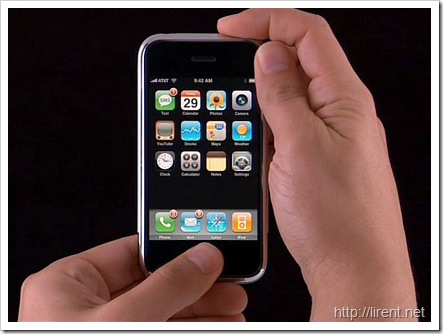
How to change the default background image ( or Wallpaper ) that appears when your iPhone is locked

You can find free wallpapers for your iphone here

Method 1

  1. Click the home button to go to the main menu. Then click on Settings
  2. In the Settings screen click on Wallpaper
  3. You have a choice of options:
    • Wallpaper will take you to Apple’s preloaded range of Wallpapers. To switch to a new one, click on its thumbnail image
    • Camera Roll lets you select from any photos you have taken with the camera. Select the one you want by tapping it
    • Photo Library (and any photo folders you have created) lets you pick from any photo you have synced with your iPhone. Select the one you want by tapping it
  4. Once you have selected the photo, you can drag your finger to move it into the position you want and use the finger-thumb pinch to zoom it in or out. When it looks right click on Set Wallpaper

iphone-wallpapers

Read the rest of this entry »

Windows 7 Ultimate

January 27, 08 by Crossover
Sponsors

[youtube -crFaYLW-xk]

Windows 7 Ultimate or ???… just a Vista theme?

Windows Seven (Blackcomb)

How to reset iPhone and iPod touch

January 27, 08 by Crossover

reset-iphone

To turn on

Press and hold the Sleep/Wake button until the Apple logo appears.

To turn completely off

Press and hold the Sleep/Wake button for a few seconds until the red slider appears, then slide the slider. When iPhone is off, incoming calls go straight to voicemail.

Read the rest of this entry »

Completorrent and Google custom search engine

January 27, 08 by Crossover

completorrent-torrent-search

After YouTorrent here you have the next generation for searching torrent files. Is called CompletTorrent and is the most comprehensive torrent search website on the internet.

How does CompleTorrent work?
CompleTorrent uses google as a backend. This makes it just as efficient as google is at categorizing links based on popularity and relevance. Basically, it puts all the popular torrents that are more closely matched to your query at the top. Also, when a site is added, CompleTorrent does not need to crawl the site. Google has already done this which means that all torrents on that site are added to CompleTorrent immediately. Which means CompleTorrent gains hundreds of torrents with each site that is suggested.

Website | Completorrent

3D photo management software

January 27, 08 by Crossover

 3dbrowser

Pictomio is Freeware and sets new standards for 3D accelerated browsing of your photo and video collection.
Pictomio requires a graphics card with ShaderModel 2.0 and a minimum of 128 MB video RAM. Pictomio is primary a photo management software that helps you to organize, view and archive your favorite photos. With Pictomio you are able to quickly find pictures, categorize them and scroll through your entire photo collections.
Pictomio supports the full potential of state of the art graphic hardware to provide the users with dynamic 3D views of their images e.g. in the slideshow-section or through the 3D image carousel.

Read the rest of this entry »

How to change default system sounds

January 24, 08 by Crossover

After the free pack with Vista Sounds, here are some rapid steps how to change the system sounds in Windows Vista and  Windows XP.

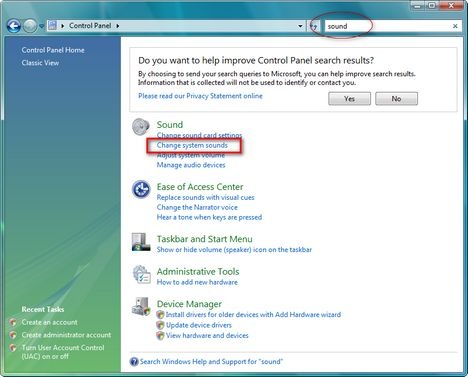
Windows Vista: First you need to go first to the Control Panel and type the word "sound" in the search box.

disable_sound1

From the list click on Change system sounds.

soundsvsita

Select the applications and click on Browse… to select another .wav file. Don’t forget to click the OK button.

Read the rest of this entry »

Download Free Vista Sounds wav

January 24, 08 by Crossover

vistasound

Here you have a Pack with Vista sounds, (Error sounds, login/out msn, login/out windows etc etc) Enjoy!

Download | Vista Sounds

Compatibility and IE8

January 24, 08 by Crossover

lh_2005_01

In Dean’s recent Internet Explorer 8 and Acid2: A Milestone post, he highlighted our responsibility to deliver both interoperability (web pages working well across different browsers) and backwards compatibility (web pages working well across different versions of IE). We need to do both, so that IE8 continues to work with the billions of pages on the web today that already work in IE6 and IE7 but also makes the development of the next billion pages (in an interoperable way) much easier. Continuing Dean’s theme, I’d like to talk about some steps we are taking in IE8 to achieve these goals.

Read more here

Page 1 of 3123»
Close
E-mail It